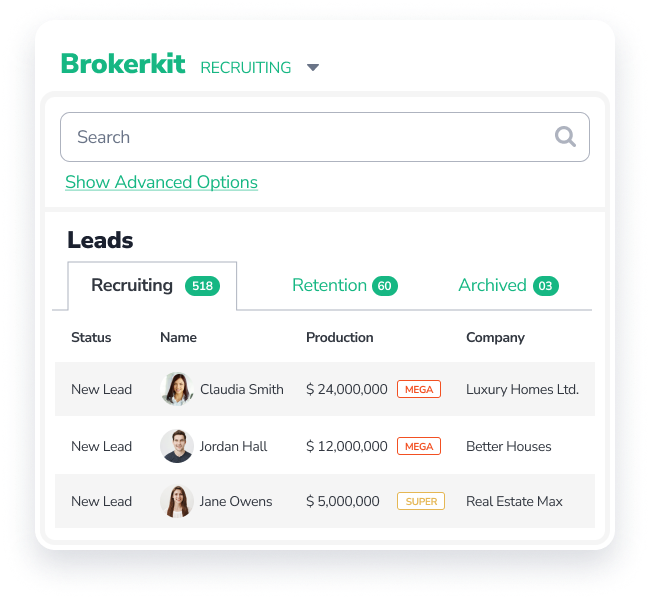
A real estate recruiting CRM should keep each prospective agent’s contact details, recruiting stage, conversation history and next follow-up in one shared record. Look for a way to bring in agent data, assign outreach to a recruiter and give the onboarding manager the context they need when an agent joins.
Use one sample agent in your software demo. Ask the vendor to take the record from your first call through the agent’s first week.
Bring in the agent record
A recruiting CRM should show where your agent data came from and give your team a way to keep it current. If you work from periodic exports, ask to see a file import. If you use a data partner, ask to see a synced record for a market your brokerage serves.
Brokerkit can import agent contact and production data from a BrokerMetrics CSV. Brokerkit also supports agent data sync with Courted and Relitix. If your brokerage works with either partner, ask which markets and data your subscription covers. In the demo, check that a recruiter can tell which office the agent works in and where the production figures came from. See Brokerkit’s data integrations.
Assign the next follow-up
A recruiting CRM should show who owns the next call and when it’s due. Ask one recruiter to log the conversation and schedule a call. Then have a second recruiter open the record and explain why the call is due.
Say an agent wants to know what coaching your brokerage offers before agreeing to a meeting. Save that question in the contact’s notes and schedule a call for after you’ve checked when the next coaching session starts. In Brokerkit, you can include call tasks in recruiting campaigns and see what’s due in the Today view. If you use AI Assist to draft a follow-up email, review what it says about the coaching program before you send it. See Brokerkit’s recruiting workflows.
If you’re a Brokerkit administrator and your Claude or ChatGPT account supports custom MCP connections, you can connect the assistant to Brokerkit. Ask it to look up the agent’s contact record and activity or prepare a recruiting email. For supported CRM changes, review the preview before you approve the change for saving. See the Brokerkit MCP integration.
Carry the conversation into onboarding
The onboarding manager should be able to see what you promised during recruiting. In the demo, move the same agent into onboarding and ask the manager to find the coaching notes. Then have them use those notes to set up the agent’s first coaching check-in.
For the agent who asked about coaching, make the first task an introduction to the person who’ll lead those sessions. Set a due date and assign it to the office manager. Brokerkit supports onboarding campaigns and task plans for work like this. See Brokerkit’s onboarding and retention tools.
Use the agent onboarding checklist to decide what else belongs in the agent’s first week.
Decide how the CRM fits your existing stack
Most brokerages evaluating recruiting software weigh three setups: a dedicated recruiting and retention CRM, an agent-intelligence platform, or a broader brokerage suite. Before you book demos, decide which team actually needs a new tool and which systems you plan to keep.
If your leadership team wants predictive market signals and movement insights, platforms such as Courted and Relitix specialize in agent intelligence—and both integrate with Brokerkit so your team can act on synced insights inside a dedicated recruiting and retention workspace. If you already rely on a consumer CRM or back-office system for active agents, a dedicated recruiting CRM lets your managers run outreach, onboarding and coaching without asking every agent to switch their client-facing tools.
Price the seats and services you need
Count everyone who needs to work in the recruiting CRM, including the managers handling onboarding. Ask for a quote with separate lines for software, setup and any partner subscriptions. If you also need help finding agents, price managed lead generation separately and ask who follows up when a candidate replies.
Brokerkit’s published monthly rates on an annual agreement are listed below. Setup covers implementation and training, and additional paid admin or staff seats are available if your team grows past the included seats. See Brokerkit pricing.
| Brokerkit plan | Included seats | Paid monthly | One-time setup |
|---|---|---|---|
| Professional | 2 | $199 | $199 |
| Performance | 8 | $399 | $399 |
| Enterprise | 25 | $999 | $999 |
BrokerBoost is an optional managed lead-generation service. Its published starting price is $499 per month (including ad spend). If your package includes Laura’s LinkedIn or email outreach, your team reviews the sequence before outreach starts. When an agent replies, Brokerkit creates a task and someone on your team follows up personally.
Get a Brokerkit demo and ask to see what your recruiter hands to the onboarding manager.