Find the agents worth calling.
Bring your market’s agent data into Brokerkit, then turn it into focused lists your team works every day.
Saved searches
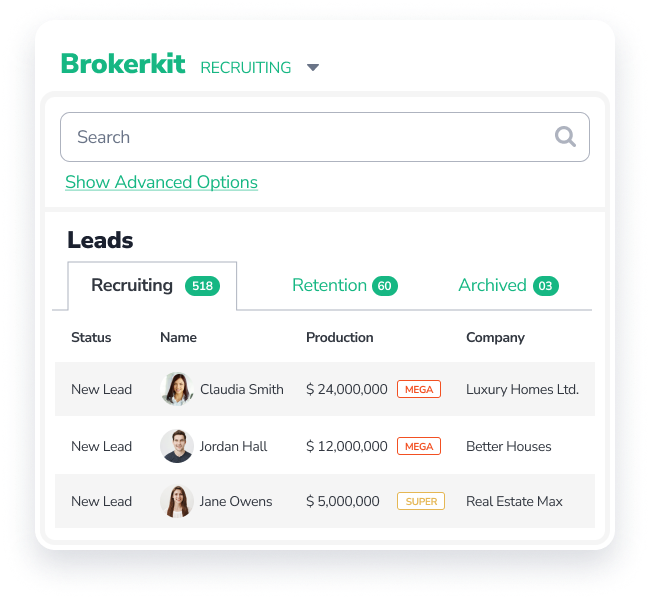
Filter by production, company, location, engagement and other properties, then save the list to work again.
Production on every list
See each agent’s production next to their name, so best-fit recruits stand out.
Agent Alerts
With Relitix, get an alert when an agent lists a property, or a property they represent goes pending, goes under contract or closes. Each alert can start a campaign automatically.
Imports
Bring in BrokerMetrics and MarketView Broker exports or any spreadsheet.
Relitix and Courted insights
Sync agent data from Relitix and Courted, and act on their AI insights in Brokerkit, such as switch risk and likelihood to move.
New recruit capture
Collect interest from agent referrals, your recruiting landing page, job postings, Zapier or the Brokerkit API.
Reach every recruit personally, on every channel.
Multi-touch outreach works when it still sounds like you. Send it all from Brokerkit and keep every reply in one shared history.
“I wanted them to sound like they came from me.”
Email
Send and receive email, one at a time or in bulk, and schedule appointments, all with your own Gmail or Outlook account.
Text
Two-way texting, one-to-one or in bulk, with scheduled sends and reply notifications.
Calls
Call from the built-in dialer, record calls and leave a prerecorded voicemail in one click.
Video
Record your webcam or screen, with virtual backgrounds, and send video by email or text. See who opens and clicks.
Social
Look up a recruit’s social profiles and add social media touches as tasks in your recruiting outreach campaigns.
AI Assist AI
Draft personal emails and texts shaped by your brand, the agent’s production and your history together.
Keep follow-up moving, and know who owns it.
Campaigns handle the timing while your team handles the conversations. Everyone sees the next step for every recruit.
“I can put together campaigns to either stay sticky with my existing agents and/or bring new leads in…”
Campaign Library
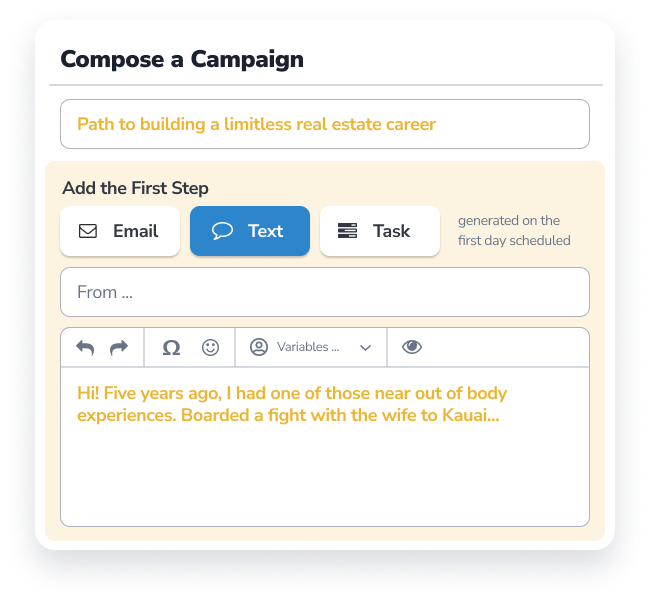
Start from ready-made recruiting campaigns, then edit the wording, timing and steps.
Multichannel steps
Mix email and text steps with call, social media and appointment tasks.
Automatic enrollment
Start campaigns automatically with campaign triggers based on lead source, dates and listing updates from the Relitix integration.
AI at scale AI
Personalize bulk and campaign emails and texts for each agent with AI Assist.
Today
Start each day with tasks due, upcoming appointments and new leads together.
Pipeline you can read
Rate every recruit from first contact to “Joining this month.”
Shared history and owners
Emails, texts, calls and notes stay together. Assign owners and choose who sees which recruits.
Reports
Track calls, appointments and new hires in Pipeline and Activity reports, and see how each campaign performs.
On your phone
Use Brokerkit on your phone to check your day and log a call between appointments. Get text replies forwarded to your phone, reply right there, and the conversation is still logged.
Welcome new agents with the history you built.
Recruiting carries straight into onboarding and retention, with the same notes, messages and team.
Explore Retention“I’ve also been able to manage retention of my current agents…”
Nothing to retype
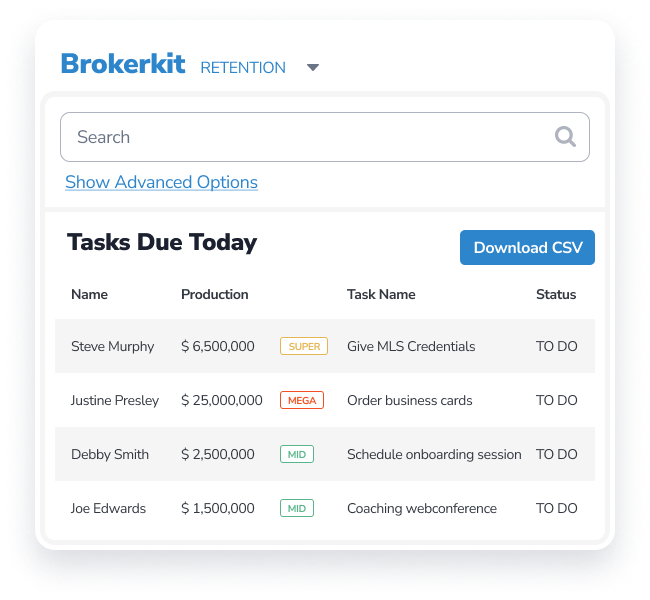
Every note, message and call from recruiting stays with the agent when they join.
Onboarding plans
Give new agents a clear plan with onboarding campaigns and tasks via task plans.
Coaching and check-ins
Stay in touch with coaching appointments, milestones and regular check-ins.
Everything included in Recruiting.
One recruiting CRM for your whole team. Some features and limits depend on your plan. See plans.
See Recruiting in action.
1 min 14 sec
Find agents
- Advanced filters and saved searches
- Production on every list
- Relitix Agent Alerts
- BrokerMetrics and MarketView imports
- Spreadsheet import
- Relitix and Courted data sync and AI insights
Reach them
- Gmail and Outlook email
- Two-way and bulk texting
- Dialer with call recording
- Voicemail drop
- Video recorder and library
- Document library
- Social profile lookup
Follow up
- Campaign Library
- Email, text and task steps
- Campaign triggers
- Today view and tasks
- Appointments on your calendar
- Inbox for replies
Work as a team
- Owners and permissions
- Recruiting pipeline ratings
- Shared contact history
- Pipeline and Activity reports
- Campaign performance
- Use it on your phone
Capture recruits
- Agent referrals
- Recruiting landing page
- Job postings
- Zapier app
- Brokerkit API
AI
- AI Assist for emails, texts, tasks and notes
- AI Assist in bulk and campaigns
- Prompt library
- Claude and ChatGPT through MCP
Built for real recruiting.
“Brokerkit has changed my business because it has made recruiting so easy.”
“It’s built for real recruiting, not just generic CRM use.”
“It all comes down to consistency and a great message. And Brokerkit helps us handle that.”
Get started with our Customer Boot Camp.
Every new Brokerkit account includes our Customer Boot Camp, so your team is ready to recruit.
Send your data
Give us your agent and recruit data, and complete the onboarding questionnaire about your company.
Set up with a specialist
In a dedicated session, an onboarding specialist helps you finish setting up email, texting and calling, load your data and connect any data integrations.
Train and coach
Join three Customer Boot Camp training sessions: the first on the product, the other two on coaching.
Want it built for you?
Add the BrokerBoost Recruiting & Retention Launch Package, and we build a personalized recruiting system and load it into your account.
Questions brokers ask.
Is Brokerkit a recruiting CRM?
Yes. Brokerkit is a real estate agent recruiting CRM built for brokerages and teams.
Can I import my agent data?
Yes. Import BrokerMetrics and MarketView Broker exports or any spreadsheet, sync agent data from Relitix and Courted and act on their AI insights, or connect other tools with Zapier or the Brokerkit API.
Does it work with Gmail and Outlook?
Yes. Send and receive email with your Gmail or Outlook account, and schedule appointments on your Google or Microsoft calendar.
Can I recruit in the US and Canada?
Yes. Brokerkit supports recruiting across the United States and Canada.
Can I use Brokerkit on my phone?
Yes. You can use Brokerkit on your phone to check your day, call, text and log notes.
How does onboarding work?
Every account includes our Customer Boot Camp. You send us your data and complete an onboarding questionnaire. An onboarding specialist then helps you finish setting up email, texting and calling, load your data and connect any integrations. Three training sessions cover the product and coaching. The Launch Package is an add-on that builds a personalized recruiting system for you.
How does Brokerkit use AI?
AI Assist drafts emails, texts, tasks and notes, including bulk and campaign messages, and you review them before they go out. You can also connect Claude or ChatGPT through MCP. For outreach run for you, see Laura in BrokerBoost.
See your recruiting process in Brokerkit.
Bring a list of agents you want to recruit. We’ll show you how your team can find, reach and follow up with them in one place.